The best tech stack for online coaches 2026 starts with a hard truth: Most coaches don’t fail because their coaching is bad. They fail because they’re running six subscriptions that don’t talk to each other, spending Sunday nights copy-pasting client emails between three different apps.
A tech stack isn’t about collecting tools. It’s about picking the smallest set of apps that cover funnel, email, client management, and automation without you becoming the glue between them.
Here’s the stack that actually works for a solo coach in 2026, what each piece does, what it costs, and how the pieces connect so nothing depends on you remembering a manual step.
Why a Coordinated Stack Beats a Pile of Subscriptions (Best Tech Stack for Online Coaches 2026)
Two coaches can pay the exact same amount per month and have completely different businesses. One has five tools that each do one job well, but nothing passes information between them, so she spends four hours a week moving data by hand. The other has four tools chosen specifically because they connect to each other, and her onboarding, follow-up, and content planning run without her touching a spreadsheet.
The difference isn’t the tools. It’s whether the stack was built as a system or assembled one shiny new app purchase at a time.
What Makes a Great Coach Stack
Three things separate a stack that works from a pile of subscriptions:
Automation. If a step needs you to manually move information from one app to another, it’s not a stack, it’s a chore list. Every recurring task, welcoming a new lead, booking a call, tagging a client, should fire on its own.
Integration. Every tool needs to talk to at least one other tool in the stack. A tool that lives on an island is a tool you’ll stop using by month three, no matter how good it is on its own.
Simplicity. As a solo coach, every extra login is a tax on your week. Four tools that cover everything beat eight tools that each do one thing slightly better.
The Coach Stack at a Glance
| Tool |
Role |
Monthly cost |
| Systeme.io |
Funnels, course delivery, email, payments |
$0 to $17 |
| AWeber |
Dedicated email once your list outgrows Systeme.io |
$0 to $15 |
| Notion |
Client tracking, session notes, content planning |
$0 |
| Zapier |
Glue between your calendar, forms, and CRM |
$0 to $19.99 |
| Calendly (free) |
Booking calls, no back-and-forth emails |
$0 |
Total: $0/month to start. $30 to $50/month once you outgrow the free tiers.
Systeme.io — The Core of the Stack
Why this tool specifically: A coach doesn’t need five separate tools for a landing page, an email list, a course area, and payment processing.
Systeme.io does all four in one dashboard, and its free plan is a real free plan, not a 14-day trial disguised as one.
Key features used by coaches:
- Sales funnel builder for discovery calls and course launches, no code needed
- Course and membership hosting for group coaching programs
- Email automation built in, so a new lead automatically gets a welcome sequence
- Native Stripe and PayPal checkout for 1:1 packages or course sales
Exact pricing:
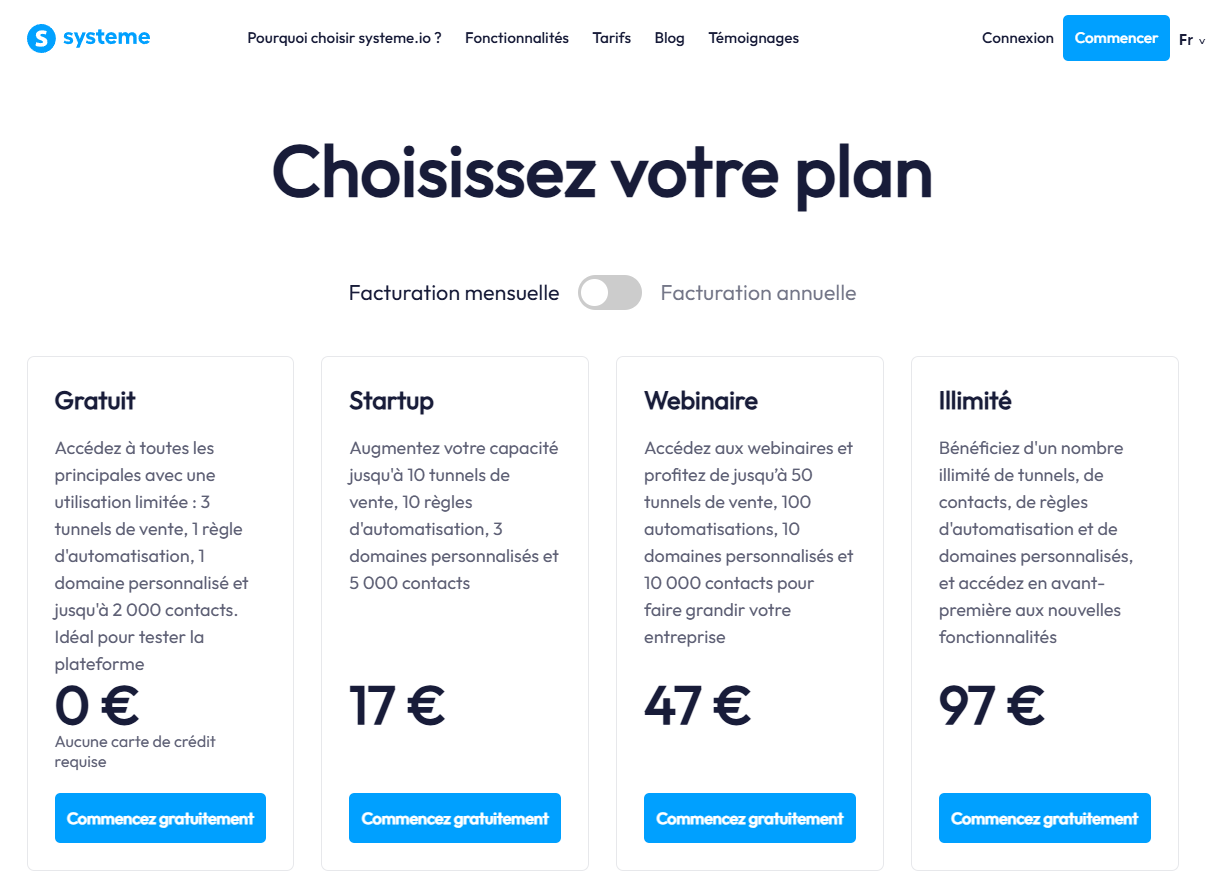
- Free: $0/month, 1 funnel (10 steps), 1 blog, 2,000 emails/month, 1 course
- Startup: $17/month ($170/year), 10 funnels, 5,000 contacts, 3 custom domains
- Webinar: $47/month ($470/year), 10,000 contacts, evergreen webinars
- Unlimited: $97/month ($970/year), unlimited everything, free migration, 1:1 coaching session included
Most solo coaches never need to leave the Startup plan.
How it connects with the rest of the stack: Systeme.io‘s contact tags can trigger a Zapier automation that adds a new lead to your Notion client tracker automatically, so a new sign-up never has to be manually entered anywhere.
AWeber — For When Your List Outgrows Systeme.io
Why this tool specifically: Systeme.io’s email tool is good enough for most coaches, but if you’re running a serious weekly newsletter on top of your funnels, or migrating an existing list,
AWeber’s deliverability track record and segmentation depth are worth the second subscription. This is a graduate-into-it tool, not a starting point.
Exact pricing:
- Free: $0/month, up to 500 subscribers, 3,000 emails/month
- Lite: $15/month ($12.50/month billed annually), unlimited emails, basic automation
- Plus: $30/month ($25/month billed annually), unlimited automations, users, advanced segmentation
- Pricing scales with subscriber count above these entry tiers
How it connects with the rest of the stack: Zapier passes new Systeme.io leads into an AWeber list segment based on which lead magnet they downloaded, so your nurture emails stay relevant without manual list management.
Notion — Client Management and Content Planning
Why this tool specifically: Coaches don’t need a full CRM built for sales teams. They need somewhere to keep session notes, track client goals between calls, and plan content, without paying for a dedicated app for each.
Exact pricing: Free plan covers a solo coach’s entire client roster and content calendar. Plus plan is $10/month per user, only needed if you bring on a VA or second coach.
How it connects with the rest of the stack: A Zapier automation creates a new Notion client page the moment someone books a discovery call through Calendly, pre-filled with their name and email from the booking form.
Zapier — The Glue
Why this tool specifically: This is the piece most coach stacks skip, and it’s the one that saves the most time. Without it, you’re manually copying new leads and bookings between apps every day.
Key automations for a coach stack:
- New Systeme.io lead → new row in a Notion tracker
- New Calendly booking → new Notion client page plus a Slack or email reminder
- New AWeber subscriber tagged hot lead → notification to check in personally
- Missed call or no-show in Calendly → automatic follow-up email queued in Systeme.io
Exact pricing:
- Free: $0/month, 100 tasks/month, single-step Zaps only
- Professional: from $19.99/month (billed annually, 750 tasks/month), scaling with task volume
A coach running three or four automations comfortably stays on the free plan or the entry Professional tier.
What Happens If You Skip the Automation Layer
It’s tempting to skip Zapier and just do it manually for now. The problem is that manual steps don’t scale, and they’re the first thing to slip when you get busy, which is exactly when a new client’s first impression matters most.
Total Stack Cost
This is the real math behind the best tech stack for online coaches 2026 — not a wishlist, but what it actually costs at each stage.
Starting out: $0/month, Systeme.io Free, AWeber Free, Notion Free, Zapier Free, Calendly Free.
Once you have a real client base (10 to 30 active clients): $17 (Systeme.io Startup) plus $19.99 (Zapier Professional), roughly $37/month, with Notion and Calendly still free.
Fully scaled coaching business: $47 to $97/month for Systeme.io, plus $15 to $30/month for AWeber, plus Zapier scaling with automation volume. Realistically $80 to $150/month at a mature, multi-program coaching business.
Budget Stack Alternative (Under $50/Month)
If you’re just starting and want to test the model before spending anything:
- Systeme.io Free plan, $0
- Notion Free plan, $0
- Zapier Free plan, $0
- Calendly Free plan, $0
- Google Forms instead of a dedicated intake tool, $0
Total: $0/month until you have paying clients, then upgrade Systeme.io to Startup ($17/month) as your first paid step.
How to Set Up This Stack in 30 Days
Week 1: Create your Systeme.io account, build one funnel for a free discovery call, connect Stripe or PayPal.
Week 2: Set up Notion with a simple client database and a content calendar.
Week 3: Connect Calendly to your funnel’s thank-you page, then build your first Zapier automation linking a new booking to a new Notion client page.
Week 4: Write and load your welcome email sequence, test the full funnel end to end as if you were a new lead.
FAQ
Do I need AWeber if I already have Systeme.io? Not at first. Add it only once your email volume or segmentation needs outgrow what Systeme.io’s built-in tool handles comfortably. That flexibility is the whole point of building the best tech stack for online coaches 2026 around free tiers first.
Is Zapier worth paying for as a solo coach? The free plan covers most new coaches. Upgrade only once you’re running more than two or three automations regularly.
Can I run this entire stack for free? Yes, until you have paying clients.
What if I already use a different tool for one of these roles? Swap it in, as long as it connects to Zapier. The point of this stack is the structure, not the specific brand names.
How long does it actually take to set this up from scratch? Following the 30-day plan above, a coach with no prior tech setup can have the full stack live and tested in under 10 hours of total work.
Keep reading
Disclosure: This article contains affiliate links. If you click and purchase through these links, I may earn a commission at no extra cost to you. I only recommend tools I genuinely believe in for solopreneurs.
Pingback: How to Automate Client Onboarding as a Coach (5 Easy Steps)
Pingback: AWeber vs ConvertKit for Solopreneurs: Which Wins in 2026?
Pingback: Best Email Marketing Tools for Course Creators in 2026